
AI Fashion Try-On Generator: A Practical Guide for Shoppers, Sellers and Stylists
Learn how to use an AI fashion try-on generator to preview outfits on a real person, test colourways, keep seams believable and plan lookbook images that sell.
Key takeaways
- Understand what virtual try-on can and cannot promise before you rely on it
- A source photo checklist that keeps face, pose and body proportions intact
- Prompt recipes for editorial, streetwear and studio ecommerce looks
- Honest guidance on rights, consent and commercial use of generated images
What an AI Fashion Try-On Generator Can and Cannot Promise
A virtual try-on tool is best understood as a visual drafting assistant. It can place a garment on a person in a photo, shift colours, and explore silhouettes quickly, which saves time before a real shoot or a purchase decision. It helps you see whether a long coat swamps a short frame or whether a colour clashes with skin tone. It is a preview, not a fitting room mirror.
What it cannot promise is exact garment fidelity. Fabric drape, stretch, transparency and the way a collar sits on a real shoulder depend on physical construction. Generated images can approximate these qualities but may smooth over details that matter, such as a hidden zip or a curved seam. Treat every output as a concept to verify, not a guarantee of how the item will look in person.
There is also a likeness question. Modern editors preserve face and pose well when the source photo is clear, but no tool should be described as producing an exact likeness every time. Small changes in jawline, hair edge or hand shape can appear. Review each result at full size and keep a human check in the loop before anything goes public.
- Use try-on to compare options, not to certify fit
- Verify fabric behaviour with a physical sample where possible
- Check face, hands and hair edges at full resolution
- Keep a human review step before publishing any image
The Source Photo Checklist for a Clean Try-On
The quality of a try-on result is largely decided before you open the editor. Start with a sharp, well-lit photo where the person fills most of the frame. Avoid heavy shadows across the torso, strong colour casts from nearby walls, and busy backgrounds that compete with the garment. A plain wall or a simple studio backdrop gives the model far more room to work.
Pose matters as much as light. A relaxed standing pose with arms slightly away from the body lets the tool read the silhouette. If arms are folded or crossed, expect the generated garment to struggle around the chest and elbows. Keep the feet visible if you plan to preview full-length looks, and avoid extreme angles that hide the waistline.
Resolution and file hygiene are easy to overlook. Use the largest version of the photo you have, crop out distracting edges, and remove obvious clutter. If the person is wearing a bulky garment underneath, the tool may inherit that bulk. A fitted base layer gives a cleaner starting point for coats, blazers and dresses.
- Sharp focus, even light, no strong colour cast
- Plain background and a relaxed standing pose
- Arms slightly away from the torso, feet visible for full length
- Fitted base layer and the highest resolution file available
How to Describe Fabric, Fit and Silhouette in Prompts
Vague prompts produce vague clothing. Instead of writing a nice coat, describe weight, texture and structure. Words such as heavyweight wool, soft brushed twill, crisp poplin or fluid satin give the editor a material cue. Add how the fabric behaves: structured shoulders, gentle drape at the hem, slight sheen under studio light. These phrases shape how the garment sits on the body.
Fit language should be equally specific. Say whether the piece is tailored close to the waist, relaxed through the shoulder, cropped above the hip or floor-skimming. Mention the closure, lapel shape and sleeve length. If you want a belt, state where it sits. Each detail reduces the chance that the model invents a different garment from the one you sell.
Silhouette is the overall shape the eye reads first. Name it directly: column, A-line, boxy, hourglass, oversized. Then describe the relationship between top and bottom, such as a long coat over slim trousers. This combination of fabric, fit and silhouette gives you a repeatable prompt structure you can reuse across a whole collection.
- Name the fabric weight and surface texture
- Describe fit at shoulder, waist and hem
- State closures, lapels and sleeve length
- Define the overall silhouette in one clear word
Testing Colourways Without Reshooting
Colour testing is one of the most practical uses of an AI fashion try-on generator. Once you have a clean base image, you can ask for the same garment in emerald, camel, oxblood or slate without booking a studio. This is useful for boutiques deciding which colourway to stock and for shoppers comparing two options before checkout.
The trick is to change one variable at a time. Keep the prompt identical except for the colour name, and add a short descriptor such as deep jewel tone or muted earth tone so the model understands saturation. Ask for the colour to affect the garment only, not the skin, hair or background. Otherwise a green coat can tint the whole scene.
Compare results side by side on a neutral screen. Check how each colour reads against the model's skin tone and the background, and note whether the fabric texture still shows. Satin and leather shift more dramatically than matte wool, so review those with extra care before you commit to a palette.
- Change only the colour term between runs
- Add a saturation cue such as deep, muted or bright
- Instruct the editor to keep skin, hair and background unchanged
- Review satin and leather colourways with extra care
Lookbook and Marketplace Image Ratios
Different channels expect different crops, and planning for them early saves rework. Marketplace listings usually favour a square or a 4:5 portrait image with the garment centred and generous margins. Lookbooks and editorial pages often use taller 2:3 or 3:4 frames that give the model room to breathe. Social feeds tend to sit comfortably at 4:5.
When you generate, compose with the final crop in mind. Leave headroom above the model and space below the hem so a square crop does not cut off shoes or shoulders. If you need several ratios from one look, generate the widest composition first, then crop inward rather than asking the model to redraw the scene at each size.
Keep a simple naming convention for exports so your team can find the right crop quickly. A short label such as square, portrait or story is enough. Consistency across a collection matters more than any single image, because shoppers compare thumbnails before they read a single product description.
- Square or 4:5 for most marketplace listings
- 2:3 or 3:4 for lookbook and editorial layouts
- 4:5 for social feeds
- Generate wide first, then crop inward for other ratios
Keeping Logos, Patterns and Seams Believable
Fine detail is where generated fashion images most often slip. Logos can warp, stripes can bend around a sleeve in the wrong direction, and stitching can disappear entirely. Before you publish, zoom in on the chest, cuffs, hem and any patterned area. If a brand mark matters, describe its placement and shape clearly and expect to review several attempts.
Patterns need a direction cue. State whether a stripe runs vertically, a check is balanced, or a print repeats at a small scale. Without that instruction, the model may scale a print too large or let it drift across a seam. Repeating the pattern description in the prompt helps keep it consistent across a set of images.
Seams and construction details sell quality. Mention topstitching, a centre back seam, a vent or a patch pocket if they are part of the design. These small phrases anchor the garment in reality and reduce the smooth, slightly plastic look that appears when a prompt only describes colour and shape.
- Zoom in on logos, cuffs, hems and patterned panels
- State pattern direction and repeat scale
- Name construction details such as topstitching or vents
- Expect several attempts before a logo reads correctly
Styling Variations from One Base Outfit
A single strong base image can support a whole styling story. Once the person and the main garment look right, ask for variations: the coat open over a knit, belted at the waist, or worn with tailored trousers instead of denim. This gives a boutique several looks from one shoot day and helps shoppers imagine the piece in their own wardrobe.
Keep the person fixed and vary the styling. That means repeating the identity and pose instructions in every prompt and changing only the supporting items. If you alter too much at once, the model may drift the face or the body proportions, and the set stops feeling like one coherent lookbook.
Group the variations by mood rather than by item. An editorial set might pair the coat with a column dress, while a weekend set pairs it with denim and boots. Presenting them as distinct stories helps customers see range without overwhelming them with near-identical frames.
- Lock the person and pose, vary only the styling
- Group variations into clear moods or occasions
- Keep one hero look per story for clarity
- Reuse the same base image across the set
Rights, Consent and Commercial Use
Before you generate a try-on with a real person, get clear permission. That includes the model, a client whose photo you are editing, or anyone whose likeness appears in the output. Explain what the image will be used for and where it will appear. Consent for a private preview is not the same as consent for a public advert.
Be careful with branded garments. A generated image of a designer coat is not a licence to imply an official partnership. Keep descriptions factual, avoid suggesting endorsement, and check the terms of the marketplace or platform where you publish. When in doubt, use your own products or clearly licensed samples.
Finally, read the terms of the tool you use. Flash Omni is an independent hosted editor, and image generation costs credits shown before you confirm. It does not promise commercial rights, exact likeness or refunds, so confirm your own usage rights and keep records of consent alongside your image files.
- Get written consent for likeness and usage scope
- Do not imply brand endorsement or partnership
- Check marketplace rules before publishing
- Keep consent records with your exported files
Keep exploring
Prompt recipes
Prompt recipes are kept in English because image and video models follow English instructions most reliably. The rest of the guide is in your language.
Emerald Tailored Coat Editorial
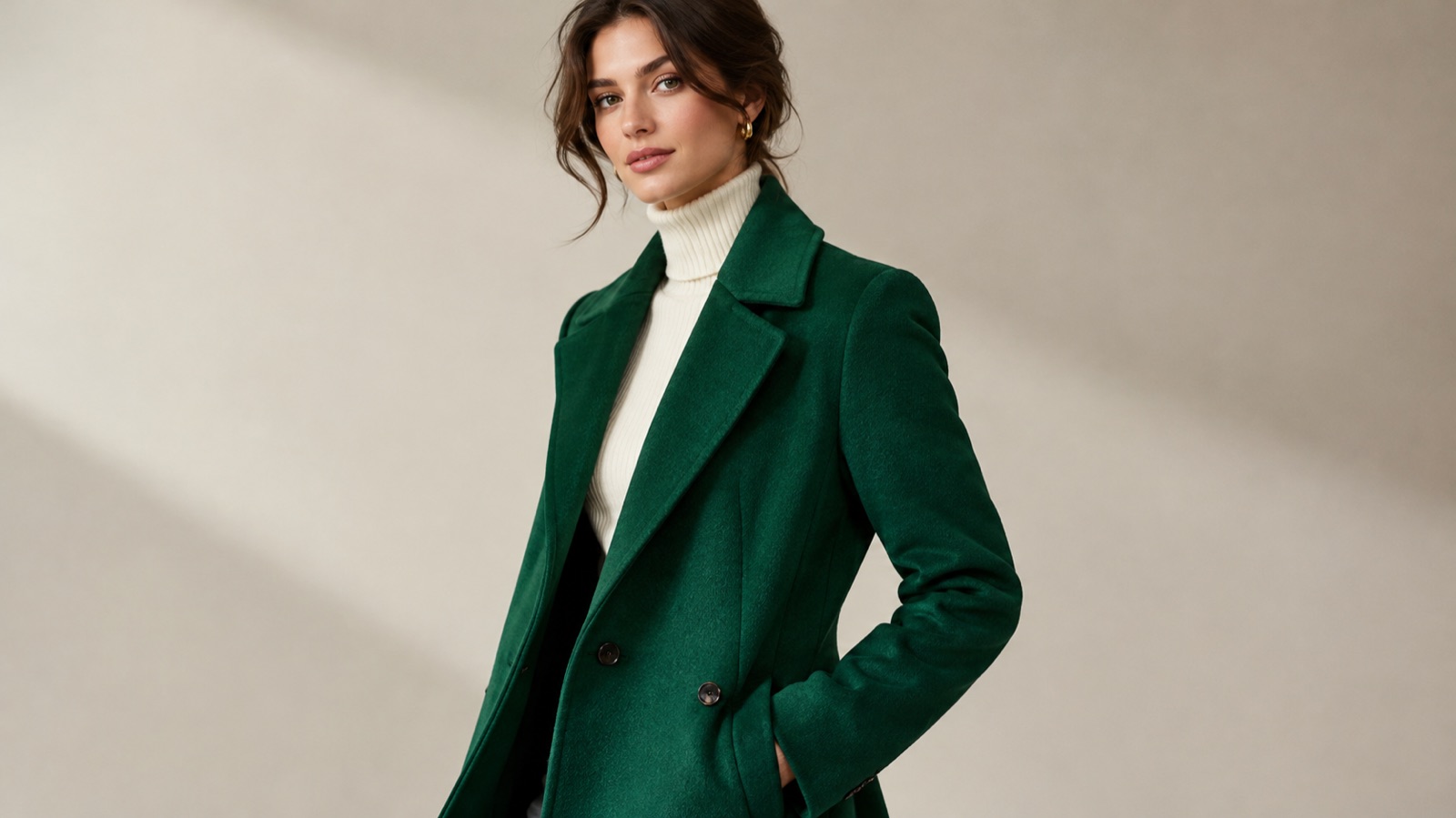
Edit the supplied photo of the person into a fashion editorial look. Keep the face, pose, skin tone and body proportions exactly as they are. Dress them in a tailored emerald wool coat with structured shoulders, a notch lapel and a hem just below the knee, worn open over a fine black knit and slim charcoal trousers. Add soft directional studio light from the left, a muted warm grey backdrop and a shallow depth of field. Preserve natural skin texture, realistic fabric weight and visible topstitching. Do not change the hairstyle or add accessories.
Streetwear Lookbook in Natural Light
Using the supplied photo as the identity and pose reference, restyle the person in a streetwear lookbook outfit. Keep the face, expression, hairline and body proportions unchanged. Dress them in an oversized washed cotton hoodie in stone grey, wide-leg cargo trousers in olive, and clean white trainers. Place them on a quiet city pavement in soft late afternoon daylight with gentle shadows and a blurred background. Keep the fabric matte with visible weave and natural creasing at the elbows and knees. Preserve realistic hands and do not alter the pose.
Studio Ecommerce Outfit on Neutral Background
Edit the supplied photo into a clean ecommerce studio image. Preserve the person's face, pose and body proportions precisely. Dress them in a fitted ribbed midi dress in deep navy with a round neck, long sleeves and a subtle side slit, paired with simple leather ankle boots. Use even softbox lighting from the front, a seamless light grey background and a full-length 4:5 composition with headroom above and space below the hem. Keep the knit texture visible, seams straight and colours accurate. Remove background clutter and do not add jewellery.
Frequently asked questions
Can an AI fashion try-on generator show exactly how a garment will fit?
No. It can preview silhouette, colour and general drape, but it cannot replicate physical fit, stretch or how a fabric behaves when you move. Use it to compare options and plan a shoot, then confirm with a real sample or a fitting before you buy stock or publish a listing.
What makes a good source photo for virtual try-on?
Use a sharp, evenly lit photo with a plain background and a relaxed standing pose. Keep arms slightly away from the torso and feet visible for full-length looks. A fitted base layer helps the tool read the body shape, and the highest resolution file you have gives cleaner detail around the face and hands.
How do I test several colourways without reshooting?
Keep the prompt identical and change only the colour term, adding a saturation cue such as deep, muted or bright. Ask the editor to leave skin, hair and background unchanged so the colour affects the garment only. Review the results side by side, and check satin and leather with extra care because they shift more than matte fabrics.
Will logos and patterns stay accurate in generated images?
Sometimes, but not reliably. Logos can warp and stripes can bend in the wrong direction, so zoom in on the chest, cuffs and patterned panels before publishing. Describe pattern direction and repeat scale clearly, name construction details such as topstitching, and expect to review several attempts before a brand mark reads correctly.
What image ratios should I use for marketplaces and lookbooks?
Most marketplace listings work well at square or 4:5 portrait with the garment centred and generous margins. Lookbooks and editorial layouts often suit 2:3 or 3:4, while social feeds sit comfortably at 4:5. Generate the widest composition first, then crop inward so you keep one consistent look across every channel.
Do I need permission to create a try-on with someone's photo?
Yes. Get clear consent from the model or client for both the likeness and the intended use, and note whether it covers private previews or public advertising. Keep written records with your files. Also check the terms of the tool you use, since generated images do not automatically grant commercial rights or imply brand endorsement.
Turn this guide into a finished visual
Open the image editor or video workspace, paste your prompt, and see the result before you spend credits. Prices and model availability are shown before you confirm a run.
- Secure checkout
- Credits shown before you confirm
- Support from the product team
This guide is maintained by the Flash Omni editorial team. Product limits, model availability, and prices can change, so verify the current workspace before you buy credits.
Related guides
AI Product Photo Generator: A Practical Ecommerce Guide
A practical guide to using an AI product photo generator for ecommerce: what to preserve, scene recipes, lighting language, catalog consistency and a publish checklist.
Read guide
AI Headshot Generator: A Practical Guide to Professional Portraits
Learn how to use an AI headshot generator for LinkedIn, resumes and team pages. Upload tips, crop ratios, lighting setups, retouch checks and prompt recipes.
Read guide
AI Couple Photo Generator: A Practical Guide to Two-Person Portraits
How to use an AI couple photo generator to merge two photos into one scene, keep both faces and proportions, match costumes, and avoid face swaps and extra people.
Read guide