
AI Pet Portrait Generator: A Practical Guide to Costume and Studio Portraits of Your Dog or Cat
Use an AI pet portrait generator to create costume and studio portraits of your dog or cat while keeping breed, markings and eye colour. Includes prompts and print tips.
Key takeaways
- Learn why pet prompts differ from human portrait prompts
- Choose the source photo that gives the model the most identity information
- Use costume ideas that keep the animal comfortable and the face visible
- Get print-ready crops, scene recipes and a pre-order checklist
Why an AI Pet Portrait Generator Needs a Different Prompt From a Human Portrait
Human portrait prompts lean on generic language: soft light, sharp eyes, natural skin. A pet prompt has to describe anatomy the model cannot guess. Ear shape, muzzle length, tail carriage and coat pattern all carry identity. If you write only dog in a costume, the model will invent a plausible animal rather than your animal. The prompt needs to lock breed, markings and eye colour before it describes the scene.
Pets also read differently in a frame. A human portrait is usually head and shoulders. A pet portrait often needs the whole body because posture and tail position are part of the character. That changes composition, lens choice and how much background you allow. Costumes add a second problem: fabric can swallow fur texture or hide the face, so the prompt must state what stays visible.
Finally, expression is harder. A human smile is a known signal. A dog's relaxed mouth or a cat's half-closed eyes are subtler, and models tend to default to wide-eyed alertness. Naming the mood, such as calm, curious or sleepy, helps more than asking for a happy pet.
- State breed, coat pattern and eye colour before scene details
- Describe ear shape, muzzle and tail because these carry identity
- Ask for a full-body or three-quarter view when posture matters
- Name the mood instead of asking for a happy expression
The Photo That Gives the Model the Most Information
The strongest source photo is sharp, evenly lit and free of clutter. Your pet should fill a good part of the frame, ideally in a three-quarter or side view that shows the face and the body markings at once. Avoid heavy filters, motion blur and strong coloured lighting, because the model will copy those casts into the result.
A single photo rarely shows everything. If your pet has a white chest patch, a dark tail tip or one blue and one amber eye, supply a second reference that shows those details clearly. Image-to-image workflows in Flash Omni accept a reference image, and extra references reduce guesswork. Keep the references consistent in age and coat length.
Photograph your pet at their eye level rather than looking down. This gives a natural head shape and avoids a distorted muzzle. If you are working from an older photo for a memorial portrait, choose the clearest one available and accept that fine detail may soften. No tool can recover information the photo never contained.
- Use a sharp, evenly lit photo with your pet filling the frame
- Add a second reference for unusual markings or heterochromia
- Shoot at eye level to avoid a distorted muzzle
- Avoid filters, harsh colour casts and motion blur
Costume Ideas That Keep the Pet Comfortable
The best costume portraits are designed, not worn. You are describing an outfit, so comfort is a creative choice rather than a physical constraint. Still, keep the design believable and kind: a bandana, a collar with a small bow, a cape that sits behind the shoulders, a hat that rests between the ears. These read clearly and leave the face open.
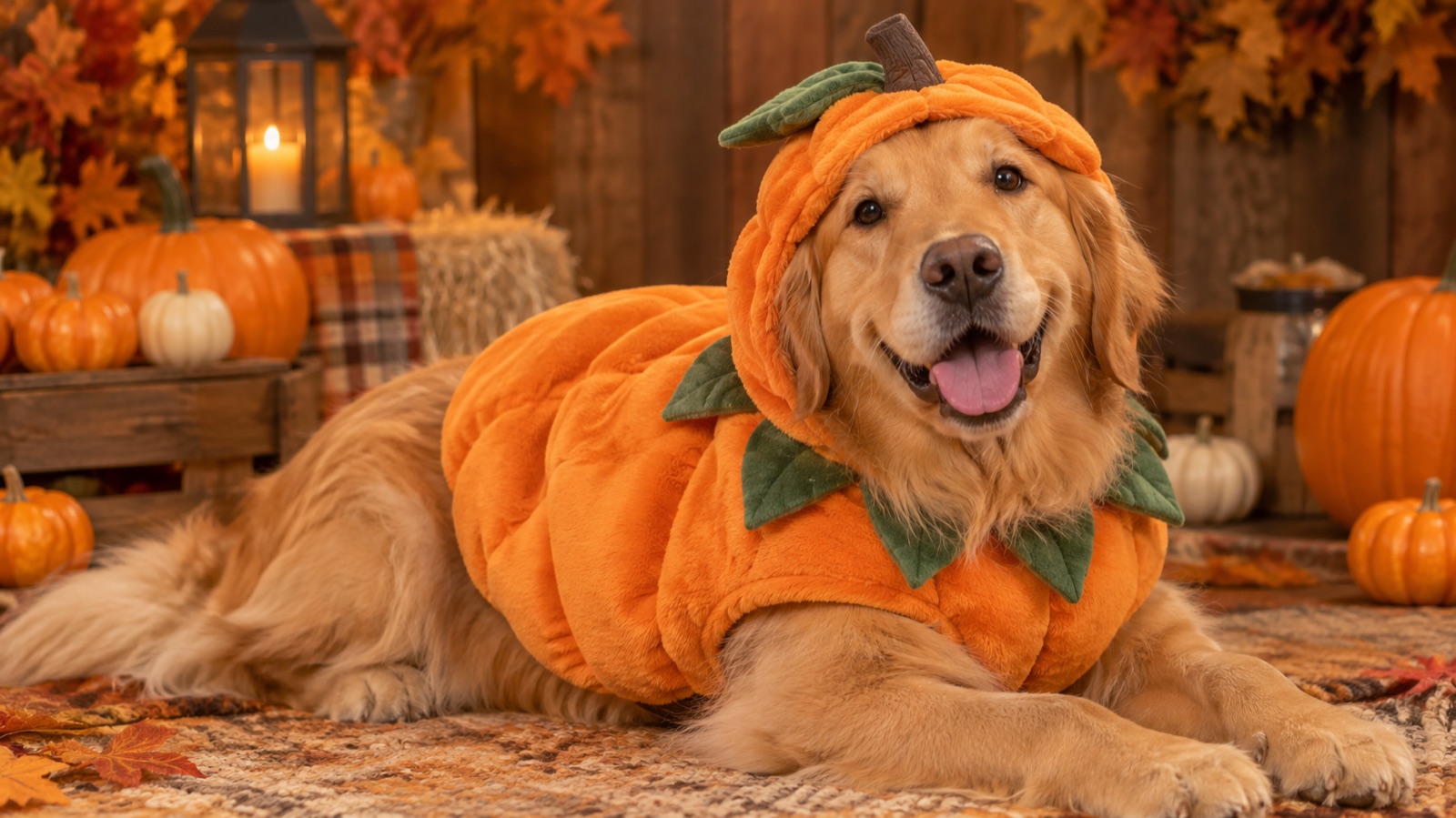
Avoid anything that covers the muzzle, presses on the eyes or wraps the throat. A full head mask hides the exact features that make the portrait recognisable. If you want a pumpkin or witch theme, use a body piece with a leaf collar or a tiny pointed hat tilted to one side, and state that the eyes, nose and mouth remain fully visible.
For cats, keep accessories small and light in the composition. A miniature witch hat or a slim velvet collar suits the silhouette. For dogs, a pumpkin body costume or a knitted autumn scarf works well. Mention the fabric texture, such as felt, wool or cotton, so the render does not look like plastic.
- Keep the face, eyes and muzzle uncovered
- Choose body pieces, collars, bandanas and small hats
- Name the fabric so the costume reads as cloth
- Scale accessories to the animal rather than to a human
How to Preserve Fur Texture and Markings
Fur is where AI portraits most often fail. Models smooth coats into soft gradients or add a glossy sheen that looks like plastic. Counter this by naming the coat type and the light behaviour: short dense Labrador coat with a slight sheen, long double coat with visible guard hairs, fine short cat fur with a matte finish. Specific language keeps texture in the render.
Markings need to be described as shapes and positions, not just colours. Say white blaze from forehead to muzzle, dark saddle across the back, white socks on the front paws, tabby stripes that break into spots on the belly. This gives the model a map to follow and reduces drifting between generations.
Eye colour deserves its own sentence. State the colour and the catchlight, for example warm amber eyes with a small soft highlight. If you are iterating, change one variable at a time so you can tell whether the costume or the coat description caused a shift. Expect some variation between runs; exact likeness is not something any current tool can promise.
- Name the coat type and how it catches light
- Describe markings as shapes and positions
- Give eye colour and catchlight separately
- Change one prompt variable per iteration
Studio, Autumn and Halloween Scene Recipes
A studio recipe is the safest starting point. Use a seamless neutral backdrop, a single soft key light from one side, a gentle fill and a subtle floor shadow. This keeps attention on the animal and the costume. Ask for a shallow depth of field so the backdrop falls away softly, and specify a calm seated pose with the chest turned slightly toward the camera.
Autumn scenes add warmth but can overwhelm the subject. Keep the palette controlled: amber and rust foliage, warm low sun from behind, a soft haze, and a simple wooden floor or wool blanket. Avoid busy leaf piles directly behind the head. The goal is a warm rim light on the fur, not a forest of competing detail.
Halloween recipes work best when they stay playful rather than horror-themed. Think carved pumpkins out of focus, candle glow, deep plum and orange tones, and a costume that stays comfortable. Keep the lighting soft so the eyes remain clear. A black cat in a tiny witch hat against a dark backdrop needs a rim light to separate the silhouette from the background.
- Studio: neutral backdrop, one soft key, gentle fill
- Autumn: warm rim light, controlled amber palette
- Halloween: soft glow, playful props, clear eyes
- Always separate a dark animal from a dark background
Print Sizes and Wall-Art Crops
Generate with print in mind. A square or 4:5 frame suits social posts, while a 3:4 or 2:3 frame gives more room for wall art. Decide the final crop before you generate, because cropping afterwards can cut an ear or a tail. Leave breathing room above the head and around the paws.
Common wall-art sizes are 8x10, 11x14, 16x20 and A3 or A2. Each has a different aspect ratio, so ask for a composition that tolerates a small trim. For a gallery wall, generate a matched set with the same backdrop and light so the frames read as a series. Keep the pet at a consistent scale across the set.
Resolution matters more than pixel count alone. Upscale the chosen image before printing and check it at 100 percent on screen. Look for smeared fur, doubled whiskers or melted costume edges. If those appear, regenerate rather than sharpening, because sharpening amplifies artefacts instead of removing them.
- Choose the aspect ratio before generating
- Leave headroom and space around paws for trimming
- Match backdrop and light across a gallery set
- Inspect at 100 percent before sending to print
Gift and Memorial Portrait Considerations
Pet portraits are popular gifts, and the practical question is whether the recipient will recognise the animal. Ask for clear photos and a short description of markings before you generate. If the portrait is a surprise, confirm the pet's name spelling and the preferred style, such as painted, photographic or illustrated, so the result matches expectations.
Memorial portraits need a gentler approach. Choose a calm pose, soft light and a simple background. Avoid costumes unless the animal wore them in life, and avoid anything that reads as comical. A quiet studio portrait with warm light usually carries more meaning than an elaborate scene. Keep the original photo safe as a reference.
Be honest about limits. An AI portrait is an interpretation, not a photograph, and fine details may differ. It is not a substitute for a professional photographer's record of your pet. Many people use both: a real photo for accuracy and an AI portrait for a styled keepsake or a gift.
- Confirm name spelling and preferred style before generating
- For memorials, favour calm poses and soft light
- Keep the original photo as the reference
- Treat the result as an interpretation, not a record
A Checklist Before You Order a Print
Run through a short checklist before you spend money on printing. Confirm the eyes are the right colour, the markings match the reference, the costume leaves the face clear and the fur texture survives at full size. Check the paws and tail for odd shapes, which are common failure points in generated images.
Then check the file itself. Confirm the aspect ratio matches your frame, the resolution is sufficient for the chosen size, and the image has no unintended text or watermark. If you plan to share it on social media, export a smaller version for faster loading. Keep the full-size file archived.
Finally, review the service terms. Flash Omni is an independent hosted AI image editor and video generator. Image generation costs credits shown before confirmation, with a one-time pack from USD 19.99 for 500 credits and monthly plans from USD 14.99 for 500 credits. Model providers and routing partners vary by model, and results differ between runs.
- Verify eye colour, markings and costume placement
- Inspect paws, tail and whiskers at full size
- Match aspect ratio and resolution to the frame
- Check credits and terms before confirming a job
Keep exploring
Prompt recipes
Prompt recipes are kept in English because image and video models follow English instructions most reliably. The rest of the guide is in your language.
Golden retriever pumpkin costume portrait
Edit the supplied photo of my golden retriever into a studio portrait. Preserve the breed, the golden coat, the exact facial markings and the warm brown eye colour. Dress the dog in a rounded orange pumpkin costume made of soft felt, with a green leaf collar resting behind the neck, leaving the face, eyes, nose and mouth fully visible. Keep the natural fur texture with visible guard hairs. Use a seamless warm grey backdrop, one soft key light from the left, gentle fill, a subtle floor shadow and a calm seated three-quarter pose. Square crop with headroom.
Black cat in a tiny witch hat
Transform the supplied photo of my black cat into a playful Halloween portrait. Keep the short dense black fur, the exact eye colour and any white markings on the chest or paws. Add a tiny pointed witch hat in deep purple felt, tilted slightly, sitting between the ears without covering the eyes or whiskers. Place the cat against a dark plum backdrop with soft carved pumpkins out of focus behind. Use a warm rim light to separate the silhouette from the background, a calm seated pose and a shallow depth of field. Keep whiskers crisp.
Autumn studio portrait with warm light
Create an autumn studio portrait from the reference photo of my pet. Preserve breed, coat length, markings and eye colour exactly. Keep the costume minimal, such as a rust wool scarf or a simple leather collar, with the face fully visible. Use a warm amber and rust palette, low warm sunlight from behind for a rim light on the fur, soft haze and a simple wooden floor. Pose the animal calmly, chest turned slightly toward the camera. Three-quarter body framing with space above the head for an 11x14 print crop.
Frequently asked questions
Will the AI portrait keep my pet's exact markings and eye colour?
It can keep them closely if you describe them clearly and supply good reference photos. State breed, coat pattern, marking positions and eye colour in the prompt. Results vary between runs, and no tool can promise an exact likeness. Review each generation and regenerate rather than accepting a near miss.
What is the best photo to upload for a pet portrait?
Choose a sharp, evenly lit photo where your pet fills a good part of the frame, ideally at eye level. Avoid filters, motion blur and strong colour casts. Add a second reference if your pet has unusual markings or different coloured eyes. Clear references reduce guesswork and improve consistency.
Can I add a costume without hiding my pet's face?
Yes, and you should specify this directly. Ask for body pieces, collars, bandanas or small hats that sit between the ears, and state that the eyes, nose, mouth and whiskers remain fully visible. Avoid full head masks, which hide the features that make the portrait recognisable.
What print size should I choose for a pet portrait?
Common sizes are 8x10, 11x14, 16x20 and A3 or A2. Decide the aspect ratio before generating so the crop does not cut an ear or tail. Leave headroom above the head, upscale the chosen image, and inspect it at 100 percent for smeared fur or melted costume edges before printing.
Is an AI pet portrait suitable as a memorial gift?
It can be, with care. Choose a calm pose, soft light and a simple background, and avoid costumes unless the pet wore them in life. Keep the original photo safe. Treat the result as a styled interpretation rather than a photographic record, and consider pairing it with a real photograph.
How much does it cost to generate pet portraits on Flash Omni?
Flash Omni is an independent hosted AI image editor and video generator. Image generation costs credits shown before you confirm a job. A public one-time pack starts at USD 19.99 for 500 credits, and monthly plans start at USD 14.99 for 500 credits. Model providers and routing partners vary by model.
Turn this guide into a finished visual
Open the image editor or video workspace, paste your prompt, and see the result before you spend credits. Prices and model availability are shown before you confirm a run.
- Secure checkout
- Credits shown before you confirm
- Support from the product team
This guide is maintained by the Flash Omni editorial team. Product limits, model availability, and prices can change, so verify the current workspace before you buy credits.
Related guides
Halloween AI Photo Editor: A Practical Guide to Editing Existing Photos
Learn how to use a Halloween AI photo editor to improve backgrounds, makeup, lighting, and group shots without replacing your original photo. Includes prompts and export tips.
Read guide
AI Couple Photo Generator: A Practical Guide to Two-Person Portraits
How to use an AI couple photo generator to merge two photos into one scene, keep both faces and proportions, match costumes, and avoid face swaps and extra people.
Read guide
AI Headshot Generator: A Practical Guide to Professional Portraits
Learn how to use an AI headshot generator for LinkedIn, resumes and team pages. Upload tips, crop ratios, lighting setups, retouch checks and prompt recipes.
Read guide